Posts

Different between HDD and SSD

Image
 Different between HDD and SSD Now let talk about the different between a HDD and an SSD The main difference between HDDs (Hard Disk Drives) and SSDs (Solid State Drives) lies in the technology they use to store data. This difference has a significant impact on their performance, durability, and cost.  Here's a breakdown of the key distinctions: The Storage Technology: HDD (Hard Disk Drive): Uses rapidly spinning platters coated with a magnetic material. A read/write head moves across the platters to magnetize tiny areas for storing data and reads these magnetized areas to retrieve data. Think of it like a record player reading data from a spinning disc. SSD (Solid State Drive): Stores data on interconnected flash memory chips, similar to the technology used in USB flash drives and memory cards. Data is stored electronically in these chips. Their Performance: HDD: Slower access times and data transfer rates due to the mechanical movement of the read/write head. Booting times,...

What is an SSD or (Solid State Drive)

Image
 What is an SSD or  (Solid State Drive) An SSD, or (Solid State Drive), is a type of data storage device used in computers that utilizes flash memory to store information. Unlike HDDs (Hard Disk Drives) that use spinning platters, SSDs have no moving parts, which makes them significantly faster and more reliable. Here's a deeper dive into SSDs: Flash Memory Technology: SSDs store data on interconnected flash memory chips, similar to the technology used in USB flash drives and memory cards. Flash memory retains data even when the power is off, making it a form of non-volatile memory. Benefits of SSDs over HDDs: Speed: SSDs offer much faster read and write speeds compared to HDDs. SSDs translates to quicker boot times, faster application loading, and improved overall system performance. Durability: The lack of moving parts makes SSDs less susceptible to physical damage from shocks and vibrations, which can damage HDDs. Noise: Since they have no moving parts, SSDs operate sile...

What is HDD or (Hard Disk Drive)

Image
 What is HDD or (Hard Disk Drive) HDD stands for Hard Disk Drive. It's a type of data storage device used in computers and other electronic devices to store and retrieve digital information.  Here's a breakdown of how HDDs work and their Let see the key characteristics: Magnetic Storage: HDDs utilize rapidly spinning platters coated with a magnetic material. A read/write head moves across the surface of the platters, magnetizing tiny areas to store data and reading these magnetized areas to retrieve data. Components: Platters: The spinning disks where data is stored. Modern HDDs can have multiple platters for increased storage capacity. Read/Write Head: The component responsible for reading and writing data to the platters. Spindle Motor: Rotates the platters at high speeds (typically thousands of RPMs). Actuator Arm: Positions the read/write head precisely over the desired location on the platters. Controller Board: The brain of the HDD, managing data transfer between the ...

Different between an NVR and a DVR

Image
 Different between an NVR and a DVR The key difference between NVRs and DVRs lies in the technology they use to handle video data from security cameras. Here's a breakdown of their core distinctions: Technology: NVR (Network Video Recorder): Works with IP cameras (Internet Protocol cameras) that transmit digital video data over a network connection (Ethernet cable or Wi-Fi). DVR (Digital Video Recorder): Deals with analog video signals from traditional CCTV cameras transmitted over coaxial cables. Image Quality: NVR: Supports high-definition (HD) or even 4K resolution video from IP cameras, providing much sharper and clearer images for identification purposes. DVR: Limited to standard definition (SD) resolution, resulting in lower quality footage with less detail. Scalability: NVR: Easier to expand your system by simply adding new IP cameras to the network. DVR: Adding new cameras requires complex and expensive cabling with additional coaxial cables for each camera. Features:...

WHAT IS A DVR (DIGITAL VIDEO RECORDER)

Image
WHAT IS A DVR (DIGITAL VIDEO RECORDER) DVR stands for Digital Video Recorder. It's an electronic device that records and stores video footage captured by security cameras. Unlike NVRs (Network Video Recorders) used in IP camera systems, DVRs deal with analog video signals transmitted over coaxial cables. Here's a breakdown of DVRs and their key functions: Recording and Storage: DVRs receive analog video signals from security cameras. The video footage is compressed and recorded onto internal hard drives or external storage devices like USB drives or external hard disk drives. DVRs offer various recording options, including continuous recording, motion-triggered recording, and scheduled recording. Applications: DVRs were widely used in traditional CCTV (Closed-Circuit Television) security systems. They are still used in some existing security systems that haven't been upgraded to IP camera technology. Limitations Compared to NVRs: Image Quality: DVRs are limited to standard...

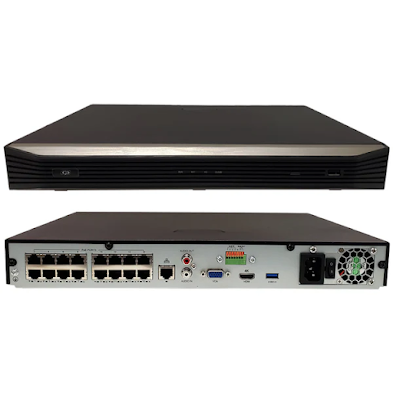
WHAT IS AN NVR (Network Video Recorder)

Image
 WHAT IS AN NVR ( Network Video Recorder) Let talk about NVRs NVR stands for (Network Video Recorder). It's a specialized computer system designed to record and store security video footage captured by IP cameras (Internet Protocol cameras). Unlike DVRs (Digital Video Recorders) used in analog CCTV systems, NVRs deal with digital video data transmitted over a network connection (Ethernet cable or Wi-Fi). Let look at the  breakdown of NVRs and their key functions: Recording and Storage: NVRs receive digital video streams from IP cameras on the network. The video footage is recorded onto internal hard drives or external storage devices like USB drives or Network Attached Storage (NAS). NVRs offer various recording options, including continuous recording, motion-triggered recording, and scheduled recording. Benefits of NVRs over DVRs: Superior Image Quality: NVRs can handle high-definition (HD) or even 4K resolution video from IP cameras, providing much sharper and clearer image...

DIFFERENT BETWEEN ANALOG PTZ and IP PTZ Camera

Image
 DIFFERENT BETWEEN ANALOG  PTZ and IP PTZ Camera Here's a breakdown of the key differences between analog PTZ and IP PTZ cameras: Technology: Analog PTZ: Uses coaxial cables to transmit analog video signals to a Digital Video Recorder (DVR) for recording and monitoring. IP PTZ: Utilizes a network connection (Ethernet cable or Wi-Fi) to transmit digital video data to a Network Video Recorder (NVR) for recording and monitoring. Image Quality: Analog PTZ: Limited to standard definition (SD) resolution, resulting in lower quality footage with less detail for identification purposes. IP PTZ: Offers superior image quality with high-definition (HD) or even 4K resolution, providing sharper and clearer images. Scalability: Analog PTZ: Adding new cameras requires complex and expensive cabling for each camera, making expansion difficult. IP PTZ: Easier to expand the system by simply adding new cameras to the network. Features: Analog PTZ: Generally offers fewer features. Some models ...